
A Colleague Needs the File: Are You Taking Care of It or Not?
Sending a 3D model to a colleague or another lab shouldn't require phone calls, software installations, or compressed files that won't open. Here is how it really works.
TL;DR
Sharing a 3D model with a colleague or another practice usually requires compatible software, files in the right format, and often a support phone call. With Dentra Viewer, you upload the file and send a link: the recipient opens it directly in their browser, without installing anything.
Your Colleague Needs the File: Are You Taking Care of Yourself or Not?
You have finished the design. Your colleague, the other practice, or the dental lab that needs to take over the work needs the 3D model. And that is where the trouble starts.
First, you try email. The file is too large: you zip it, upload it to WeTransfer, and send the link. Your colleague downloads it, tries to open it, and calls you because their software cannot read it or because they do not know how to navigate the 3D view. You spend twenty minutes on the phone explaining how to rotate the model on a screen you cannot see. In the end, they look at just one angle, tell you it looks fine, and you are left wondering whether they actually understood what you were showing them.
This happens every single time. Not because you or your colleague lack tech skills: it is the workflow itself that is broken.
The Problem Is Not the File, It Is How You Share It
An STL file or a CAD project file is not designed to be opened by just anyone. It requires specific software, and that software needs to be installed, kept up to date, and is not always free. If you work with one design software suite and your colleague uses another, the chances of the file opening without conversion issues or data loss are slim.
Then there is version control. You send the file today, notice an inaccuracy tomorrow, and send a second file. Now your colleague has two files, does not always know which one is the right one, and ends up working on a version you have already corrected.
The result, at best, is wasted time. At worst, it is an error discovered too late, once production has already started.
How Dentra Viewer Works
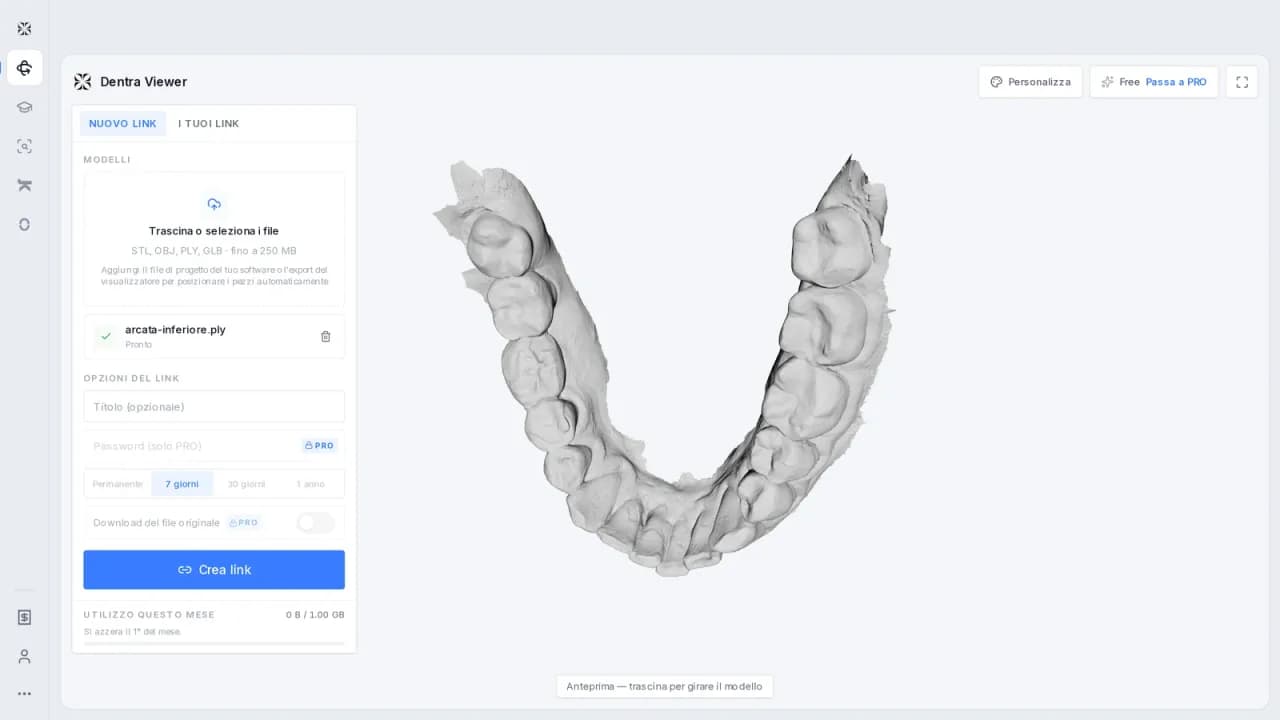
Dentra Viewer is designed specifically for this: you upload a 3D model and send a link to whoever needs it. Whoever receives it opens it on their phone or computer, directly in the browser, without downloading anything and without creating an account.
There are just three steps:
- Upload the model to Dentra Viewer.
- The platform generates a link.
- Send the link to your colleague, the lab, or the clinic.
Whoever opens the link sees the 3D model, can rotate it, zoom in, and inspect the details from any angle. They do not need to install any software, they do not need a specific version of any program, and they do not need to ask you for help.
The practical advantage is simple: you can send the same link to multiple people, at different times, and everyone sees the exact same file. If you update the model and upload a new version, you can send an updated link. No more zipped files floating around, no more duplicate versions piling up across different folders.
When You Actually Need It
The most common scenario is handing off a case between the clinic and the lab, or between two dental labs. You have designed a framework, and your partner lab needs to evaluate it before milling or layering ceramics. Instead of crossing your fingers that the file arrives and opens properly, you send a link. The lab checks the model in three seconds, gives you the green light, and work moves forward.
It also works when you need a quick second opinion from a colleague on a complex case. You do not need to schedule a call with screen sharing, and you do not need to explain how to open the file. You send the link, they take a look whenever they have a free moment, and they get back to you.
And, of course, it works with patients: if you need to explain how their prosthetic restoration is designed, you can send the link straight to their WhatsApp. The patient opens it on their phone, sees the model, and understands what they are getting. No paper printouts, no physical models hauled into the operatory just to show something.
Something That Does Not Get Said Often Enough
There is an aspect of this kind of tool that tends to be overlooked: informal traceability. When you send a file by email or via chat, you have no way of knowing whether it was opened, by whom, or on what device. If misunderstandings arise later about what was actually shared, piecing together the timeline becomes a headache.
With a shared link, there is only one file, in one single place. It will not solve every communication issue in a practice or a lab, but it at least eliminates the confusion caused by duplicate files and scattered messages.
You Do Not Need to Be a Tech Expert
Dentra Viewer does not require you to know how to use CAD software. It does not require any dedicated digital infrastructure. Anyone with a 3D file to share can use it: upload, copy the link, send it. The platform takes care of the rest.
If you want to try it out, you can find Dentra Viewer at dentra.it/it/dentra-viewer.
Founder and CEO — Dentra
Second-generation dental technician, specialised in dental CAD/CAM, 5-axis milling and Toronto Bridge design. Founder and CEO of Dentra.