
Surgical Guide: What You Send and How You Approve the Design
Having a digital surgical guide designed for implants is not complicated, but you need to know what to send and how the review process works before heading into surgery.
TL;DR
To order a surgical guide design on Dentra Core, you need the CT scan in DICOM format and the intraoral scan in STL or OBJ. The design is reviewed and approved in 3D prior to production: no file is sent without your sign-off.
Getting a surgical guide designed is one of those things that seem more complicated than they actually are, at least the first time around. Anyone who doesn't do it every day immediately gets stuck on a simple question: what exactly do I send?
The answer is less involved than it sounds, but it's well worth understanding properly. Because an incorrect or incomplete file delays everything, and in an implant case, timing matters.
What You Need to Get Started
To design a surgical guide you need two things, and neither can replace the other.
The first is the patient's CT scan, in DICOM format. A 2D radiographic image isn't enough: you need the three-dimensional volume to see where the implants are, what bone is available, and how much space there is between anatomical structures. DICOM is the standard format generated by any CBCT or medical CT scanner: if you're not sure how to export it, the imaging center will provide it on request on a USB drive or send it via download.
The second is the intraoral scan, in STL or OBJ format. This represents the surface of the soft tissues and remaining tooth structures: it's used to cross-reference the bone geometry with what is actually visible in the mouth, ensuring the resulting guide seats properly on the teeth or mucosa. If you use an intraoral scanner, you export directly from there. If you still work with physical impressions, the stone model is scanned and the file is ready.
Together, these two files allow the design to be built. One without the other is simply not enough.
When you upload the order to Dentra Core, you can also attach a prescription with the case specifications: implant positions, planned brand and diameter, and any surgical protocol you intend to follow. It's not mandatory, but the more information you give the designer, the less back-and-forth there will be later.
How the Review Process Works
Here lies the part that many underestimate, yet it's the one that makes all the difference.
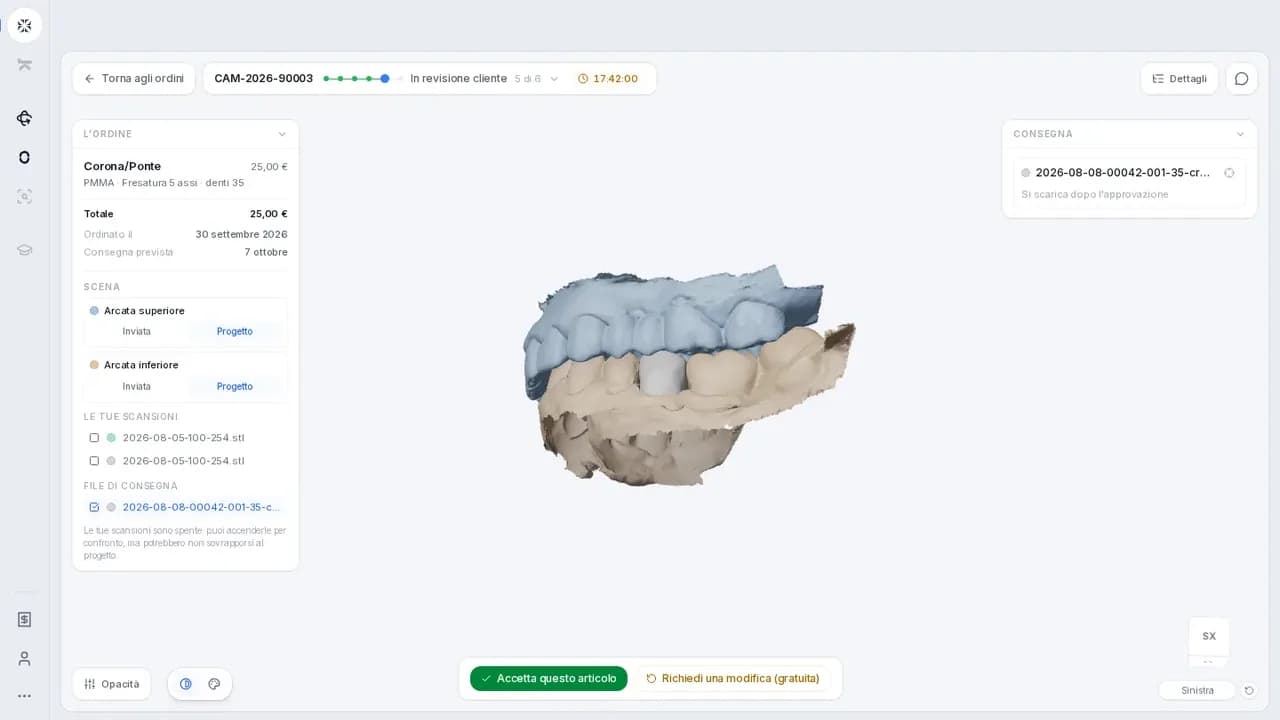
Once the design is ready, it doesn't go straight into production. With Dentra Core, the project is presented to you in 3D, and you approve it before anything is milled or printed. You see the implant positions, the angulation, the resulting guide design, and how the guide seats on the teeth or palate. If something isn't right, you point it out right there.
This step isn't a mere formality. It's the moment when the surgeon checks the digital design against their clinical planning, catching any discrepancies before they turn into problems. In certain clinical situations, a guide printed with an angulation off by just two degrees changes everything.
If you choose the Premium service, the design also goes through an internal review before reaching you: a second look meant to catch the most obvious errors, inconsistencies between the CT scan and the surface scan, and details that get missed when working in a rush. It's not an absolute guarantee, but it is an extra layer of quality control. For a surgical guide, where the margin of error is low, it makes absolute sense to consider it.
Once you give the green light, the file is locked. It can no longer be edited, there are no intermediate versions floating around, and there's zero ambiguity about which design was approved.
After Approval
Dentra handles the design, not the manufacturing. The file generated upon approval is production-ready: you can send it to your lab, print it on your own printer, or, if you've enabled this option, have it manufactured directly by a partner lab through the platform. In that case, manufacturing, shipping, and billing are handled by the lab, not by Dentra.
What changes compared to a traditional workflow is that you only need to be in one place: you upload the files, track the order status in real time, review the design, and give your approval. You don't have emails with multiplying attachments, you don't have project versions saved across different desktop folders, and you don't need to call anyone to check on the progress of the job.
For pricing and turnaround times, which are updated periodically, always refer to the price list at dentra.it/it/prezzi.
A Case Prepared the Right Way
A well-designed surgical guide reduces chairside time, increases the predictability of the outcome, and makes surgery much more manageable, even in complex cases. But all of this only holds true if the initial design is accurate, and the design is only accurate if the right files were sent in the first place.
A complete DICOM, an STL or OBJ scan, and clear instructions. Then the designer takes care of the rest, you review it in 3D, and you're good to go.
If you'd like to order a surgical guide design, or want to better understand how the workflow works, start with Dentra Core.

Founder and CEO — Dentra
Second-generation dental technician, specialised in dental CAD/CAM, 5-axis milling and Toronto Bridge design. Founder and CEO of Dentra.