
The File No One Can Open: Problem Solved
You send an STL file to a patient or colleague, and they can't open it. It always happens. With a simple link, you can solve this in thirty seconds, with no app installation required.
TL;DR
When you send a 3D file via email or WhatsApp, almost no one can open it without specific software. With Dentra Viewer, you upload the model and share a link: anyone can open it instantly from their phone or computer, without installing anything.
The File Nobody Can Open: Problem Solved
Have you ever sent an STL file to a colleague or a patient and waited half an hour for them to reply, "I can't open it"?
It happens almost every time. The reason is simple: 3D files from scanning or design software can't be opened with anything pre-installed on a normal user's phone or computer. You need to have the right program, the right version, and know how to use it. A colleague in another practice probably doesn't have it. A patient certainly doesn't.
The problem isn't the file. The problem is how you send it.
What Usually Happens
The most common scenario: the dentist receives the design from the lab, wants to show it to the patient before proceeding, and sends the file via email or WhatsApp. The patient tries to open it on their phone, sees an unknown icon, and doesn't know what to do. They call the practice back, and the practice has to find another way.
Or: two colleagues want to discuss a case, one sends the file, the other doesn't have compatible software. They end up describing what they see on the screen verbally, or sending a flat screenshot that doesn't say much.
In both cases, time is lost, and the information transfer remains incomplete.
How Dentra Viewer Works
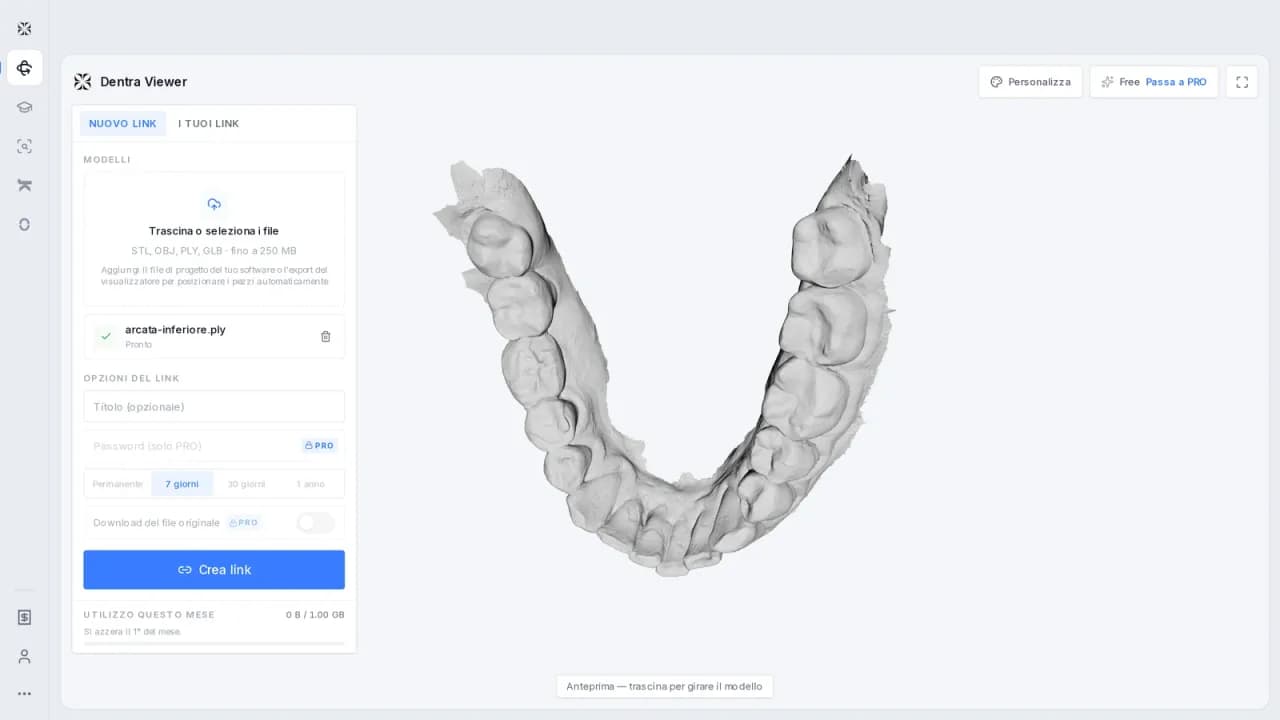
Dentra Viewer solves this problem in the most direct way possible: you upload the 3D model to the platform and get a link. Anyone who receives that link opens it in their browser, without downloading anything, without creating an account, without installing apps. It works on phones, tablets, computers, on any operating system.
The model can be rotated, enlarged, and viewed from any angle. It's not an image: it's the actual file, navigable in three dimensions.
The steps are as follows:
- You upload the 3D file to Dentra Viewer.
- The platform generates a shareable link.
- You send the link via WhatsApp, email, SMS, however you prefer.
- The recipient opens it immediately in their browser.
Nothing else.
Who Uses It and For What
For a dental lab, Dentra Viewer is useful whenever you want to show a design before producing it. You send the link to the dentist, they open the model on their computer or phone between patients, look at it, approve it, and reply. They don't need any software installed.
For a dentist, the most obvious case is communication with the patient. Showing a real 3D model, the actual one for the case in progress, has a very different effect than a generic diagram or a stock photo. The patient understands what they are about to receive, asks more precise questions, and arrives at the next appointment with clearer expectations.
It also works for communication between colleagues: a second opinion, a remote consultation, a case to discuss with a specialist. You send the link, the other person opens it, and you discuss the case with something concrete in front of you.
The Real Point
Sharing a 3D file seems like a technical detail, but in fact, it's a step that slows down or interrupts the workflow every time someone can't open what you've sent them. It's not a matter of the recipient's competence: it's that the 3D format is not yet as transparent as a PDF or a photo.
Dentra Viewer does exactly what a PDF does compared to a Word file: it makes the content accessible to anyone, without requiring anything from the recipient.
The other thing worth mentioning: the link is sent in thirty seconds. There's no procedure to learn, no account to create for the recipient. You just open it.
If you work with 3D files and want to stop wasting time explaining how to open them, try Dentra Viewer: dentra.it/it/dentra-viewer.
Founder and CEO — Dentra
Second-generation dental technician, specialised in dental CAD/CAM, 5-axis milling and Toronto Bridge design. Founder and CEO of Dentra.