
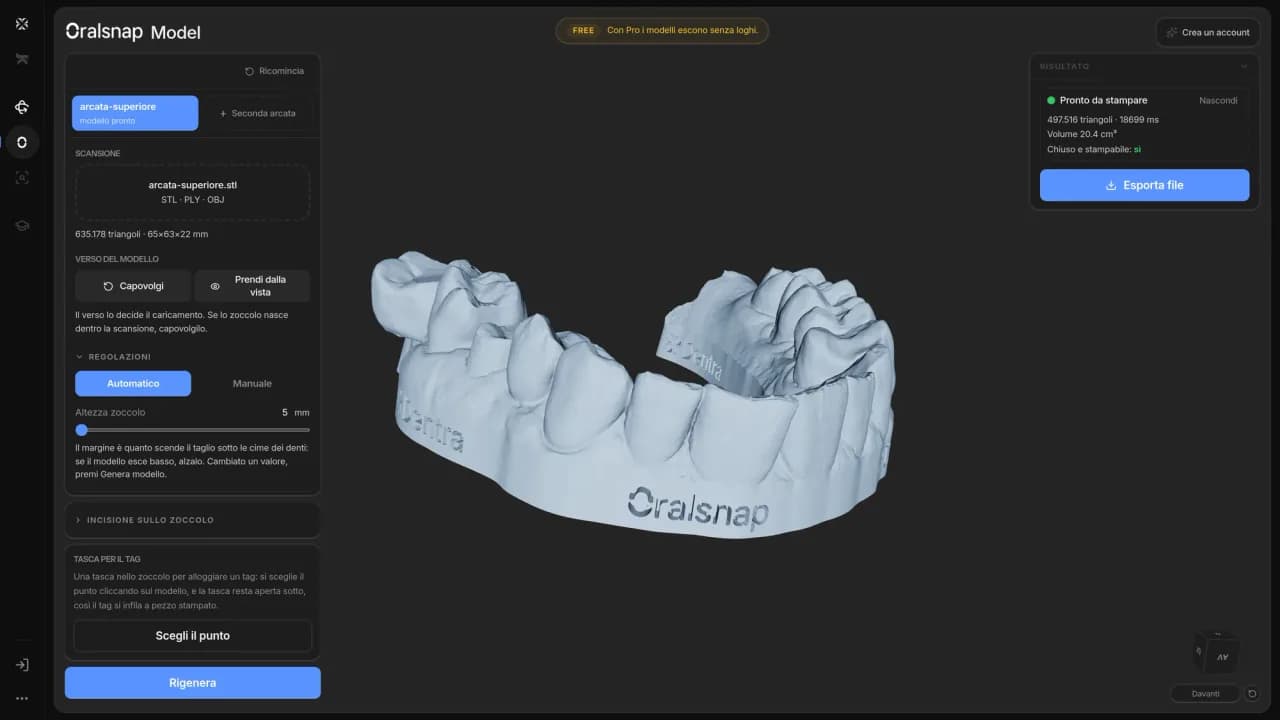
Printable Model in 30 Minutes, Without Opening a CAD
From intraoral scan to 3D print-ready file: with Oralsnap Model, you don't need to know how to use design software. Here's how it works, step by step.
TL;DR
With Oralsnap Model, you upload the scan and automatically get the model with identified margin, trimmed base, and built plinth, ready for 3D printing. You don't need to open CAD software or know 3D modeling. It's free.
Printing a model from an intraoral scan seems simple until you sit down in front of design software for the first time. Then come: tracing the margin by hand, building the base, cutting the bases so the model stands upright and doesn't wobble on the printer. If you already know how to use that software, it's twenty minutes. If you don't, it can take an afternoon, or a call to the dental technician to ask them to do it.
The problem, in reality, isn't the scan: the machine does that. The problem is the step between the raw file that comes out of the scanner and the file ready for the 3D printer. That step requires opening a design program, understanding where to click, and not messing up the geometry of the base, otherwise the model will print crooked or with walls that are too thin.
Oralsnap Model is Dentra's tool that automates that step.
How it works, concretely
You upload the scan file, the one your scanner already provides. Oralsnap Model finds the margin automatically, trims the base, and builds the base with the correct shape for printing. The file you get is already oriented and ready: you send it directly to the 3D printer, without opening any other design program in between.
You don't have to draw anything, you don't need to know 3D modeling, you don't need to know how CAD software works. The system makes the geometric choices for you: where the margin passes, how the base connects, what height the base should be.
It's free.
This is important to mention because people often think that such a tool must cost something, or that there's a limited version and a paid one. That's not the case: Oralsnap Model is used without a subscription and without usage fees.
Who it's really for
If you already have someone in your practice who manages 3D files, you probably already have a workflow that works. But there are situations where this tool solves a concrete problem.
The dentist who wants to print study models directly in the practice, without going through the lab for every single file. They have the scanner, they have the printer, but they don't have the time or the desire to learn design software just to prepare models.
The dental technician who receives scans from multiple practices and needs to quickly prepare files for printing, without each scan becoming a separate modeling job. With Oralsnap Model, the workflow is standardized: the scan comes in, the ready file goes out.
The lab that is starting to receive orders for printed models and wants to see if it's worth managing them internally, without immediately investing in CAD training or dedicated staff.
In all these cases, the bottleneck isn't printing: it's file preparation. Oralsnap Model removes that bottleneck.
What it doesn't do
It's worth stating clearly, because there's no point in expecting more than a tool promises.
Oralsnap Model prepares the anatomical model for printing. It doesn't design restorations, it doesn't draw crowns or bridges, it doesn't calculate the margins of an implant structure. For that, you need CAD design, which is a different thing.
If your need is "I take the patient's scan and I want a physical model to hold in my hand or to use for a guide," Oralsnap Model does exactly that. If, on the other hand, you start with a scan and want to end up with a milled zirconia crown, the path is different and involves design: that's the part Dentra Core handles.
The two tools do not overlap: one prepares the anatomical model for printing, the other manages the design, approval, and production cycle of prosthetic restorations.
Something that isn't said enough
Many practices already have a 3D printer, or are considering one. The reasoning is usually: "if I have a printer, I can produce models independently." That's true, but the printer alone isn't enough. You need the right file, prepared in the right way. And if every time you want to print a model you have to open design software, trace the margin by hand, and build the base, that autonomy comes at a time cost that isn't immediately apparent in the machine's quote.
Oralsnap Model is what's missing between scanning and printing: the automatic step that makes autonomy truly autonomous.
You can try it now at dentra.it/it/oralsnap-model.
Founder and CEO — Dentra
Second-generation dental technician, specialised in dental CAD/CAM, 5-axis milling and Toronto Bridge design. Founder and CEO of Dentra.