
Send a Link, and Your Patient Views the 3D Project on Their Phone
Is it still challenging to explain your patient's future smile? A simple link opens the 3D model on their phone, no app download needed. Here's how it truly works.
TL;DR
With Dentra Viewer, you upload a 3D model and send a link. Your patient opens it on their phone or computer without any installation, rotates it, examines it from every angle, and gives their approval even before sitting in the dental chair. No attached files, no app, no misunderstandings about the expected outcome.
Have you ever explained to a patient what their bridge would look like, and they nodded, and then when they saw the finished work they said, "that's not what I expected"? It's not their fault. A flat rendering on a screen, a photo of a similar case, a hand drawing: none of these tools truly communicate shape, volume, or proportion. The patient nods because they trust you, not because they understood.
The problem isn't trust. It's that between what you, as a clinician, see and what they can imagine, there's a gap that words can't bridge.
The 3D file already exists. The problem is showing it
If you already work digitally, the three-dimensional model exists from the moment the design is confirmed. It's there, in the design software. The problem is that to open it, you need that software, which the patient doesn't have, which the lab technician colleague might not have in the same version, which the referring dentist sometimes doesn't even know.
So the file remains closed, and we go back to photos or words.
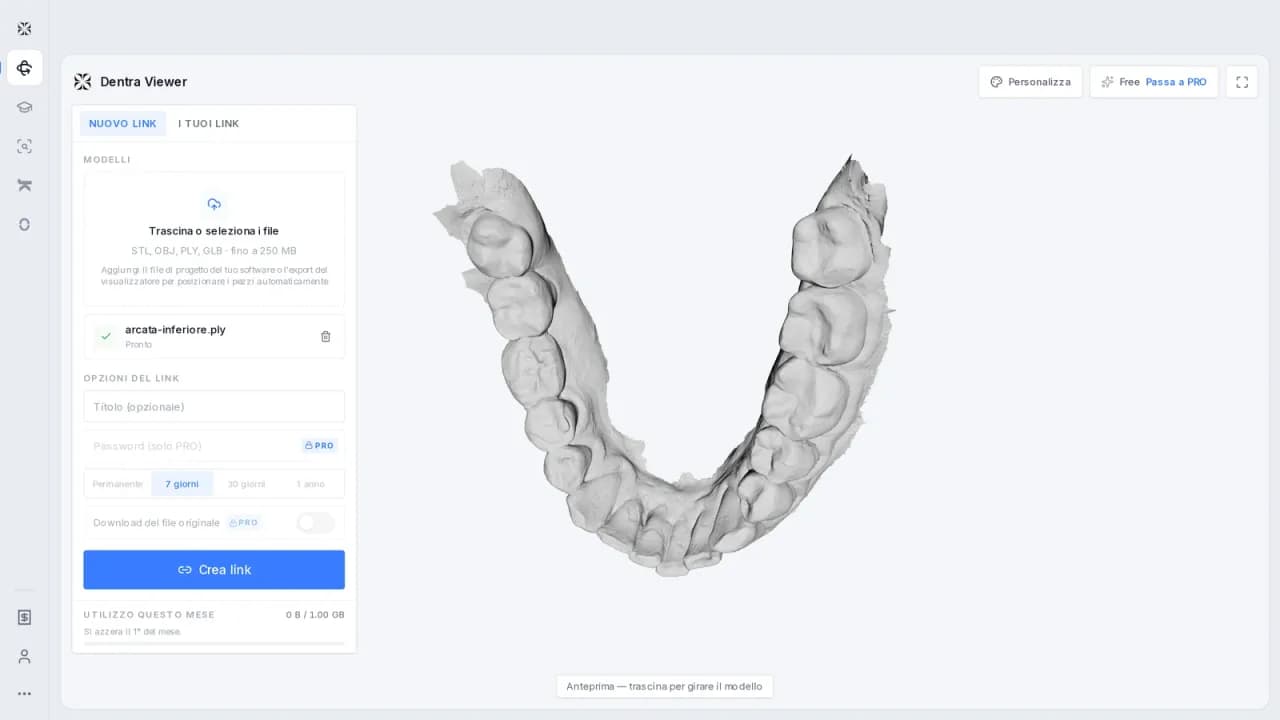
Dentra Viewer exists to solve exactly this: you upload the 3D model to the platform and get a link. Whoever receives the link opens it from their browser, phone, or computer, without downloading anything, without creating an account, without going through any other application. They see the model, rotate it, zoom in, look at it from every angle as if they were holding it in their hand.
How it works in practice
The workflow is simple.
- The design is confirmed, and the 3D file is available.
- You upload the file to Dentra Viewer.
- You get a link to send to the patient, colleague, lab, or anyone who needs to see it.
- The recipient opens the link, navigates the 3D model, and can give you precise feedback.
There's no app to install. There's no plugin. There's no need for the patient to know what an STL or OBJ file is. They open the link just like they would open any web page.
This changes the type of conversation you can have. Instead of describing the work, you show it. The patient can tell you exactly what they see, what they like, what concerns them. Corrections, if needed, emerge before production has started: much better than a phone call after delivery.
Who uses the link, and for what
Dentra Viewer isn't just for patients. In the daily practice of a clinic or lab, there are various situations where sharing a 3D model is useful.
A dental technician who wants to show an aesthetic proposal to the referring dentist before proceeding. A dentist coordinating with an implantologist colleague and needing to share the designed surgical guide. A lab working remotely with multiple practices and not wanting to manage huge files attached to emails.
In all these cases, sending a link is cleaner, more readable, and more professional than attaching files to a message chain. And above all, it avoids the classic error: someone opens the wrong version of the file, works on it, and the project has to be redone.
Something that seems small but isn't
There's a detail that changes the weight of this in the patient relationship.
When a patient can see their design in 3D, touch it with their fingers on their phone screen, rotate it and look at it even at home, in the evening, calmly, what happens is that consent becomes real. It's no longer "I signed the paper." It's "I saw what they're going to do to me, I understood, I agree."
This reduces misunderstandings after delivery. It reduces second thoughts halfway through the process. And, in a regulatory context like the European one for medical devices, having a record of approval on the design before production is never something to complain about.
Dentra Viewer does not replace the visit, nor does it replace the clinical conversation. But it adds a concrete tool to make that conversation more precise.
If you want to try it, open Dentra Viewer, upload a model, and send the link to someone. It only takes a few minutes to see if it works in your workflow.
Founder and CEO — Dentra
Second-generation dental technician, specialised in dental CAD/CAM, 5-axis milling and Toronto Bridge design. Founder and CEO of Dentra.