
You Sent the Scan, but the Model Isn't Right
The scan is ready, but the resulting model isn't what you actually need. Here's why this happens and how to fix it without touching CAD software.
TL;DR
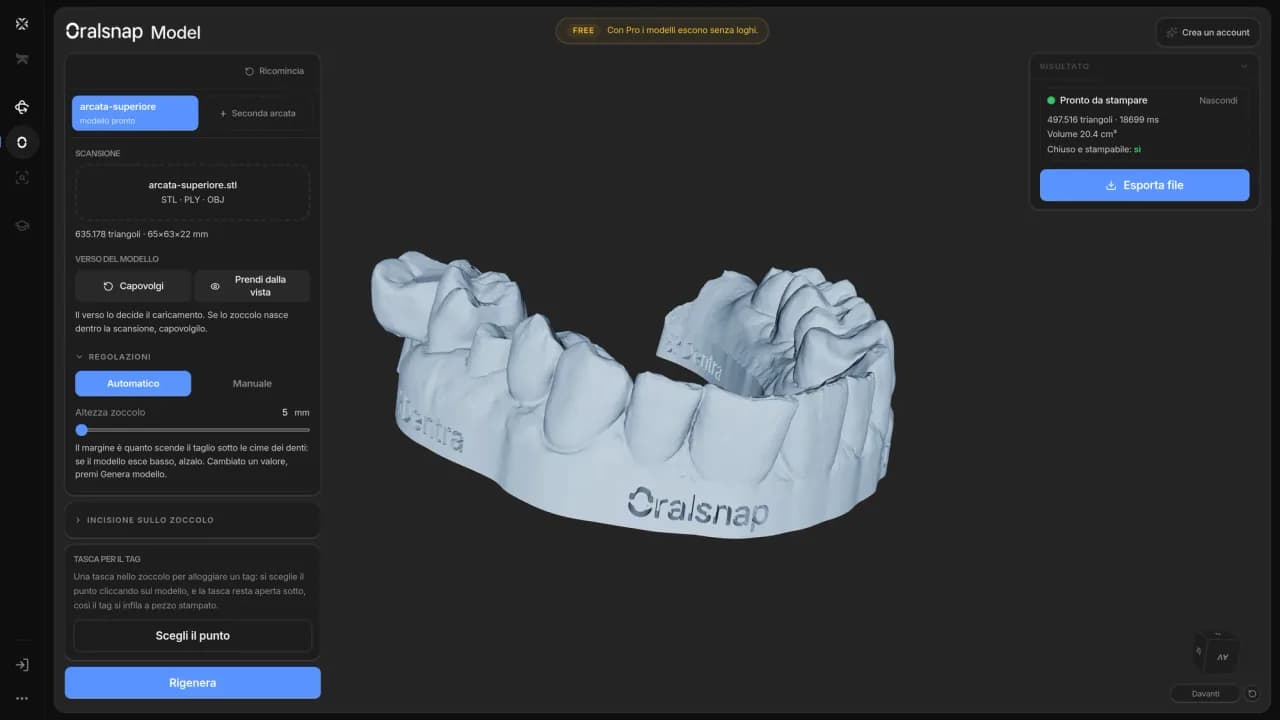
When the printed model doesn't match the scan, the issue is almost always in the intermediate step: the file wasn't prepared correctly for printing. Oralsnap Model automates that step—detecting the margin, trimming, and building the base—without requiring any CAD skills.
You take the scan, export the file, send it off. Then the physical model arrives and something is off: the margin is inaccurate, the base is crooked, or the model is completely unusable for what you needed to do. You start all over again.
Almost always, the problem isn't the scanner. The STL file coming out of an intraoral scan is raw by definition: it contains the geometry of the mouth just as it was captured, without any preparation for 3D printing. To get a printable model, you still have to identify the margin line, trim away excess data, and build the base with the right proportions. These are technical steps, and if you don't execute them properly, the model you get isn't the one you need.
The issue is that this intermediate step, in many clinics and labs, is done manually within CAD design software. And not everyone knows how to use it, not everyone has the time to learn, and even those who use it daily can make mistakes when rushing.
Where the Work Gets Lost
The margin is the first place where things get tricky. Accurately pinpointing the preparation line, especially in cases where the margin is subgingival or poorly defined, requires close attention and some experience with the software. If you set it incorrectly, everything that follows is built on a flawed foundation.
Then there is the base. It isn't just aesthetic: the proportions of the base affect model stability on the build platform, how easily supports are removed, and practical handling in the lab. A base that is too thin will break; one that is too thick wastes resin and printing time.
These aren't rare mistakes. They happen when you're just starting out, but they also happen to experienced technicians simply because there isn't a standardized workflow and every case starts from scratch.
How Oralsnap Model Works
Oralsnap Model handles this exact step, automatically. You upload the scan, the system detects the margin, trims the mesh, and creates the base. What you get back is a print-ready file, without ever opening design software, setting parameters manually, or risking operator error.
No specific training is required. You don't need an in-house dental technician. It works even if the only thing you know how to do with an STL file is open it.
The workflow looks like this:
- Scan with your intraoral scanner.
- Export the STL file.
- Upload it to Oralsnap Model.
- The system detects the margin, trims, and generates the base.
- Download the print-ready file.
Five steps, none of which require CAD software expertise. And the file you receive is already optimized to go straight to the printer.
Who Really Benefits
Dental practices that want to 3D print models in-house benefit by eliminating dependence on an external lab just to prepare the file. You have the scanner, you have the printer, but the gap in between was slowing everything down. Oralsnap Model bridges that gap.
Dental laboratories that receive scans from multiple clinics and need to prepare files before printing benefit just as much. If every file requires manual work in CAD software, file prep quickly becomes the bottleneck. Automating it means handling higher volumes without adding bench time.
Then there are the common edge cases: the associate covering for the practice owner one day a week who never learned the software, or the clinic that bought a 3D printer six months ago and barely runs it because file preparation turned into a roadblock.
In all these scenarios, the solution isn't learning yet another program. It's cutting out a step from the workflow that shouldn't require specialized CAD skills in the first place.
One Thing Worth Clarifying
Oralsnap Model does not do prosthetic design. It doesn't design crowns, build bridges, or engineer implant frameworks. It does one thing only: it takes the raw scan and delivers a print-ready model. For everything else, CAD design remains a distinct, dedicated process.
But if that is your bottleneck—if your raw scan can't turn into a printable model without spending hours in software you aren't fully comfortable with—then Oralsnap Model is the right tool for the job. And it's free.
You can try it directly at dentra.it/it/oralsnap-model.
Founder and CEO — Dentra
Second-generation dental technician, specialised in dental CAD/CAM, 5-axis milling and Toronto Bridge design. Founder and CEO of Dentra.