
Toronto Bridge: How the Lab Approves the Design Before Milling
Milling a Toronto Bridge without anyone inspecting the design in 3D is the fastest way to end up with a remake. Here is how to avoid it with Dentra Core.
TL;DR
With Dentra Core, the lab uploads the scan, receives the CAD design within 24 working hours, and approves it in 3D before any production begins. No remakes due to communication errors, no files sent back and forth by email.
A Toronto Bridge is one of those cases where errors cost the most. Not because of the technical difficulty itself, but because of what happens upstream: production starts without the lab or clinician having truly reviewed the design, and the issue is only noticed once the zirconia disc has already been milled.
How many times has it happened: the file arrives, you send it to production, and then you discover that the clinician had a different smile line in mind, or that the cantilever was too long for the most distal implant. That is not a milling error. It is a communication error that occurred earlier, in a step that lacked any shared visual verification.
The Problem Isn't CAD, It's the Approval Workflow
Anyone working on implant frameworks knows this: you don't fix a Toronto Bridge on six or more implants halfway through. If you hit the brakes after milling, you scrap the disc and start over. If you hit the brakes before, you lose a day. But at least you don't waste material and you don't have to reschedule the patient.
The critical issue is almost always the same: the design is shared as a file, a screenshot, or verbally over a phone call. The clinician says "yes, looks good" without having rotated the model, without having checked the contact points from an occlusal or basal view, without having assessed the prosthetic emergence profile. Not because they are careless, but because they lack a practical tool to do so at that moment.
And the lab, often, can't wait. There are other jobs in the queue, the milling machine needs to run, and they move forward banking on the fact that "it usually works out."
Usually, that is.
How Approval Works on Dentra Core
With Dentra Core, the workflow is different, and the difference lies right at the approval stage.
The lab uploads the scan directly to the platform, specifies the job parameters (framework type, material, number of units, reference implants), and immediately receives an automated quote. No phone calls for pricing, no emails with missing attachments.
From that moment, CAD design begins. Within 24 working hours of order confirmation, the design is ready for review.
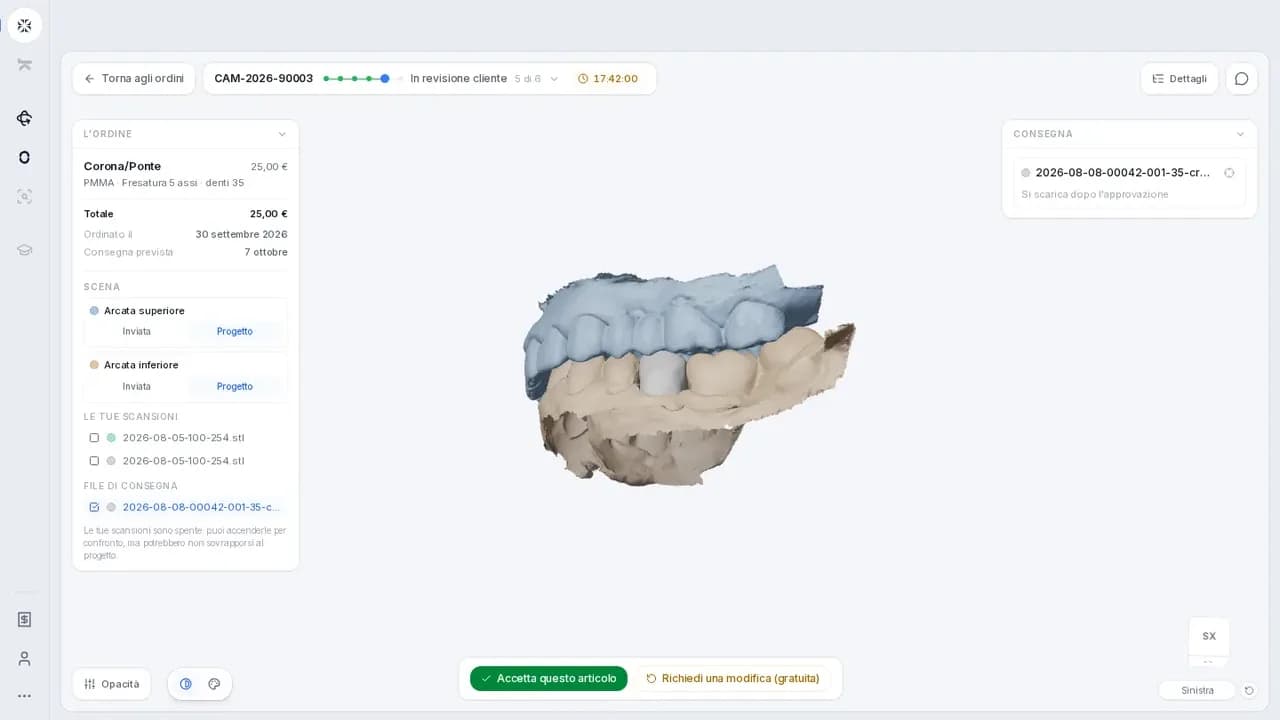
And this is where everything changes: the design doesn't arrive as a static image or as a file requiring specialized software to open. It arrives directly on Dentra Core, where the responsible party views it in 3D, rotates it, inspects it from every angle, and decides whether to approve it or request a modification. Everything happens within the platform, with no file transfers, no messages across separate channels.
Only after explicit approval does production begin. Not before.
This means that a lab without an in-house milling unit, or one experiencing production overflow on this type of work, can outsource the entire framework to the Dentra partner network with total confidence that nothing will be milled without the design being reviewed and approved. And the lab dealing directly with the clinician can use the exact same workflow to get the dentist's sign-off before proceeding.
Why This Changes the Relationship With the Clinician
A Toronto Bridge represents a major commitment for the patient. The clinician who planned it wants a say in the final prosthesis: not just regarding functional dimensions, but also tooth morphology, harmony with soft tissues, and overall aesthetics.
When the lab can say "take a look at the design here, rotate it, tell me if it works for you, and only then do we start," the conversation with the clinician changes completely. It's no longer a negotiation over who shoulders the blame for a remake. It is a shared technical check, carried out before the restoration physically exists.
This type of workflow reduces post-production revisions, eliminates downtime, and clears away that gray area where no one is quite sure who was supposed to ask what to whom.
Order Status, Invoicing, and the Rest
Dentra Core doesn't stop at the approval stage. Once the design is confirmed, the lab can track order status in real time right from the platform: you know when the framework is in production, when it's ready, and when it's out for delivery. You don't have to call to check where things stand.
And at the end of the month, you get a single consolidated invoice covering all orders for that billing period. For labs working with multiple milling centers and juggling dozens of separate invoices, it's a detail that makes a real difference in daily operations.
For Toronto Bridges just like any other implant-supported restorations: it's worth trying a workflow where the design is approved before milling, not after.
You can get started on Dentra Core.
Founder and CEO — Dentra
Second-generation dental technician, specialised in dental CAD/CAM, 5-axis milling and Toronto Bridge design. Founder and CEO of Dentra.