
Dentra Core
Reviewing the design
Before delivery the design comes to you: you open it in 3D inside Dentra, with no software to install.
When it's your turn
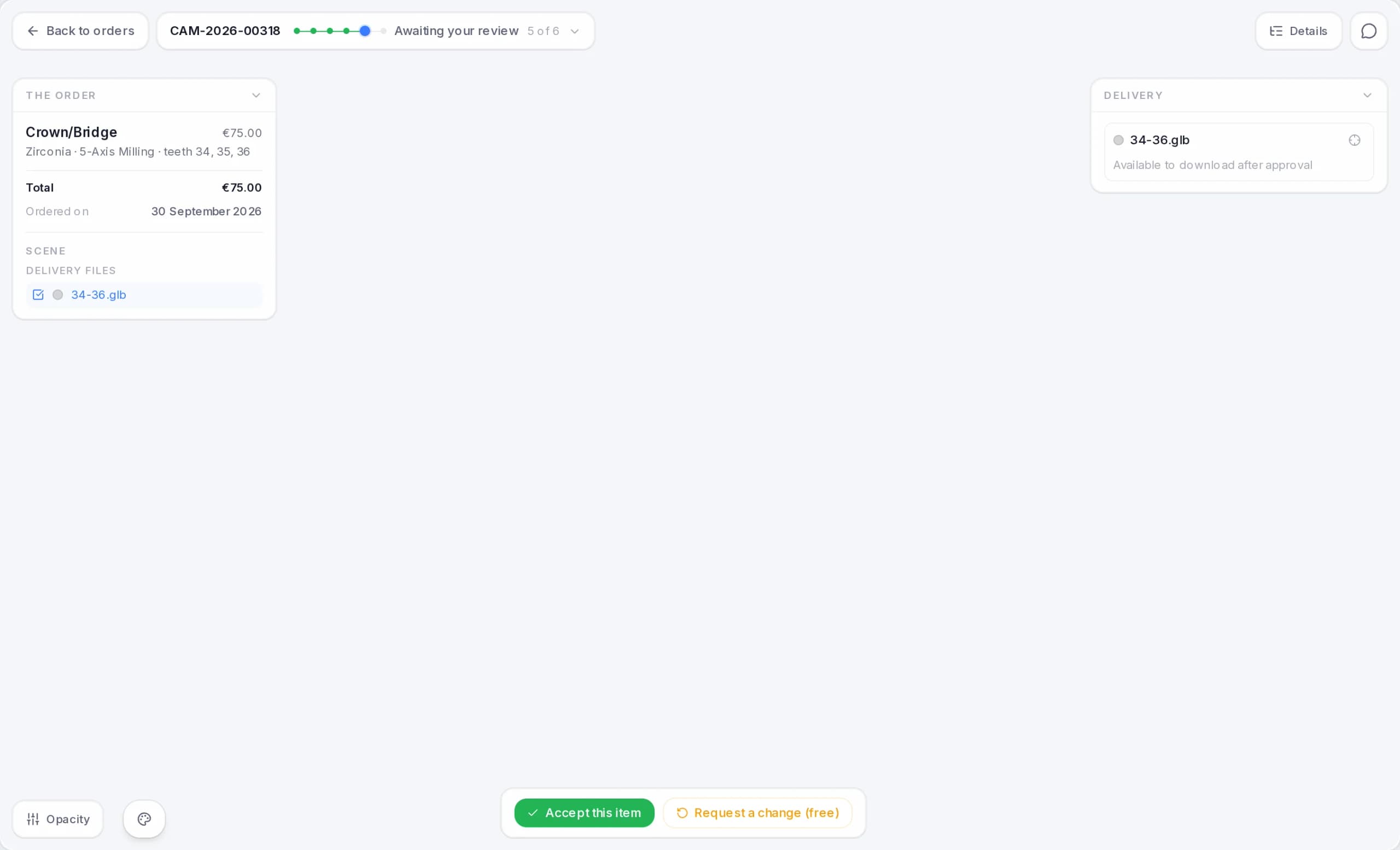
When the design has passed the quality check, the order becomes Awaiting your review. Open it: the design is on screen in 3D, with the buttons to decide.
How much time you have
You have 24 hours to decide. The clock stops on Saturdays, Sundays and Italian public holidays; on weekdays it keeps running overnight. A countdown at the top tells you how much is left.
If time runs out, the items you haven't decided on are considered accepted: if you didn't request any changes, the order is delivered. You can still request a change afterwards, once the work is delivered, until it's invoiced.
Accepting the work
- 1
Look at the design
Rotate it and zoom in. From the Scene panel you can also show your scans to compare.
- 2
Accept this item
Press “Accept this item” and confirm. When all the items in the order are accepted, the order becomes Delivered and the files can be downloaded.
Requesting a change
- 1
Open the request
Press “Request a change”. The brush turns on over the model.
- 2
Draw on the areas
Drag over the model to highlight the areas to fix. You can undo the last stroke or clear them all.
- 3
Describe the change
Write what to change: at least 10 characters, at most 2000. For example: “in the highlighted areas the cusp is too high”.
- 4
Send request
Press “Send request”. The order goes back: in the list and on its page it shows in red, “Change in progress”.
Once it's sent, “Change requested” appears instead of the buttons. Each item can have only one open change at a time: to request another one, wait until the current one is finished.
After the request
- We send you the corrected design. When it's ready we write to you and the order goes back to Awaiting your review, with fresh time to decide. You review it like the first time: accept it, or request another change, which costs €5.00.
- We reply without changing anything, for example with a clarification. The reply arrives in the order messages and by email, and you can also read it next to the change button, after “Dentra's reply:”. The work goes back to how it was: if you were reviewing, you get the full time to decide again; if it was Delivered, it's Delivered again. You don't pay for this request and it doesn't use up your free change.
When the corrected design comes back to you, in the Delivery panel the “Versions” button shows you the versions of the file: with “Compare with current” you overlay them and see what has changed.
What a change costs
- The first change on each item is free.
- Every further change costs €5.00 and goes on your end-of-month invoice.
- This applies both during the review and after delivery, until the item is invoiced: from then on, changes can no longer be requested.
- If we reply without changing anything, you don't pay for the request and it doesn't count: if it was your first, you still have your free change.
When a change has to be paid for, you see the price first. Press “Send request”: the page shows you what it costs and the button becomes “Send and pay €5.00”. Press it to confirm; if you don't, nothing is sent and you pay nothing.
Orders with more than one item
If the order contains several items you decide one by one: each is accepted or corrected on its own. The ones you don't decide on are considered accepted when time runs out. The order becomes Delivered only when all its items are accepted: if you correct one, the others wait for it.
How long does it take to receive my work?
Designs are delivered within 24 business hours of order confirmation, which works out at about 3 working days. If you need it sooner, you can choose an earlier date in the summary.
What does «24 business hours» mean?
We count the hours from 9:00 to 18:00, Monday to Friday, excluding Italian public holidays. The count stops if something is missing from your side to move forward, for example a file or an answer.
Can I request a rush job?
Yes, in the order you can choose a delivery date earlier than the standard one. The earlier you go, the higher the price, up to a maximum of 30% of the total. The exact amount is always shown in the summary before you confirm.
How does the review before delivery work?
The design reaches you in 3D before final delivery. You have 24 business hours to accept it or ask for a change: you draw with the brush on the areas to fix and add a note. The first change on each item is free. If you don't reply within that time, the work is considered accepted. After a request the order shows in red, “Change in progress”: the corrected design comes back to you for review or, if the change isn't needed, we reply in the order messages.
Can I request a change after delivery?
Yes, until the item is invoiced, usually until the end-of-month invoice. From the app you open the 3D model of the work, draw with the brush on the areas to correct and write a note: the request reaches the team with all the context. The order goes back and shows in red, “Change in progress”: meanwhile the files you had stay available to download, and the corrected design comes back to you for review. The order is invoiced in the month it's delivered again. If you haven't used the free change for that item yet, it's free; otherwise it costs €5. Once the item is invoiced, changes can no longer be requested: for new work, place a new order or write to us.
How many changes can I request and how much do they cost?
There's no maximum, until the item is invoiced: after that, no more changes can be requested. The first change on each item is free, during review or after delivery; every further one costs €5 and goes on your end-of-month invoice. Before sending a paid one you see the price and confirm it. Each item can have only one open change at a time. If we reply without changing anything, for example with a clarification, you don't pay for the request and it doesn't count: if it was your first, you still have your free change.
What happens if the design has an error on our side?
We remake the file free of charge after a technical check, if you report it before the try-in or cementation. We don't refund materials, production work, transport or clinical costs. The details are in the Order Terms, in the section on design errors.